

Hey there! As a supplier of VMC 850 CNC machines, I've had my fair share of questions about adjusting the worktable position. It's a crucial part of getting the most out of your VMC 850 CNC, and I'm here to walk you through the process.
First off, let's talk about why adjusting the worktable position is so important. In a VMC 850 CNC, the worktable is where you place your workpiece. The accuracy of its position directly affects the precision of your machining operations. If the worktable isn't properly positioned, you might end up with parts that don't meet the required specifications, which can be a real headache.
Now, let's get into the nitty - gritty of how to adjust the worktable position.
Understanding the Basics of the VMC 850 CNC Worktable
The worktable in a VMC 850 CNC can usually move in multiple directions. Most commonly, it can move along the X, Y, and Z axes. The X - axis typically represents the left - to - right movement, the Y - axis is for the front - to - back movement, and the Z - axis is for the up - and - down movement.
Before you start adjusting, it's essential to understand the control panel of your VMC 850 CNC. Different machines might have slightly different control interfaces, but they generally have buttons or a touchscreen for axis movement. You'll also need to know how to set the zero point. The zero point is the reference position from which all other positions are measured.
Step - by - Step Guide to Adjusting the Worktable Position
Step 1: Prepare the Machine
Before you start adjusting the worktable, make sure the machine is turned on and in a safe state. Check that there are no obstructions on the worktable or in the machine's working area. Also, ensure that the power supply is stable.
Step 2: Set the Zero Point
Setting the zero point is like setting a starting point for your machining operations. On most VMC 850 CNC machines, you can set the zero point by using the control panel. Look for a button or option related to "zero setting" or "reference point." You can set the zero point for each axis (X, Y, and Z) separately.
For example, to set the zero point on the X - axis, move the worktable to the leftmost or rightmost position (depending on your preference) and then press the zero - setting button for the X - axis. Repeat this process for the Y and Z axes.
Step 3: Adjust the Position Along the X - Axis
To move the worktable along the X - axis, find the X - axis movement buttons on the control panel. Press the appropriate button to move the worktable to the left or right. You can usually control the speed of the movement as well. Some machines have a jog function, which allows you to move the worktable in small increments.
If you need to move the worktable to a specific position, you can enter the desired X - coordinate on the control panel. The machine will then move the worktable to that position automatically.
Step 4: Adjust the Position Along the Y - Axis
The process for adjusting the worktable along the Y - axis is similar to that of the X - axis. Use the Y - axis movement buttons on the control panel to move the worktable forward or backward. Again, you can use the jog function for precise movements and enter a specific Y - coordinate if needed.
Step 5: Adjust the Position Along the Z - Axis
Moving the worktable along the Z - axis is crucial for setting the height of the workpiece. Use the Z - axis movement buttons to move the worktable up or down. Be careful when moving the worktable along the Z - axis, as you don't want to damage the cutting tools or the workpiece.
Step 6: Check and Fine - Tune
After making the initial adjustments, it's important to check the position of the worktable. You can use measuring tools like calipers or micrometers to verify the position. If the position is not accurate enough, you can make further fine - tuning adjustments using the jog function on the control panel.
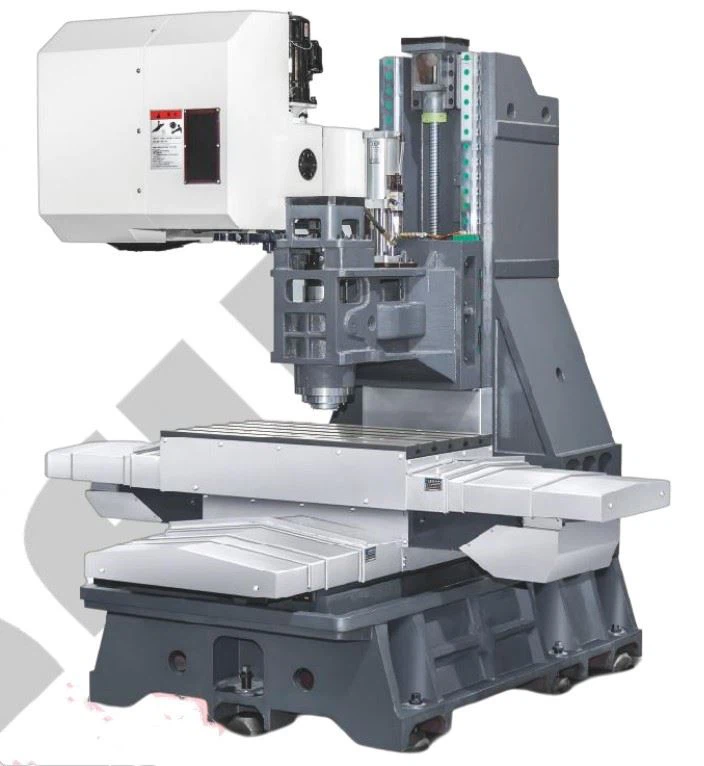

Tips for a Smooth Adjustment
- Keep the Machine Clean: Dirt and debris on the worktable or in the machine's guideways can affect the accuracy of the worktable movement. Regularly clean the worktable and the guideways to ensure smooth operation.
- Use the Right Tools: Having the right measuring tools is essential for accurate adjustments. Invest in high - quality calipers, micrometers, and other measuring devices.
- Follow the Manufacturer's Instructions: Each VMC 850 CNC machine might have specific instructions for adjusting the worktable position. Make sure to read and follow the manufacturer's manual carefully.
Our VMC 850 CNC Machines
At our company, we offer top - notch Precision Cnc Milling Machine 850. Our machines are designed with precision and durability in mind. We also have a wide range of VMC Cnc options to meet different customer needs. And if you're looking for something more compact, our Desktop 3 Axis Cnc Milling Machine is a great choice.
If you're in the market for a VMC 850 CNC machine or need more information about adjusting the worktable position, don't hesitate to reach out. We're here to help you make the most of your machining operations.
References
- CNC Machine Operation Manuals
- Machining Technology Textbooks


