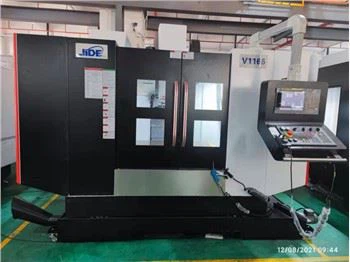
Hey there! As a supplier of VMC 850 CNC machines, I've had my fair share of experiences with programming these bad boys. In this blog, I'm gonna walk you through how to program a VMC 850 CNC machine, sharing some tips and tricks along the way.
Understanding the Basics
First things first, let's talk about what a VMC 850 CNC machine is. VMC stands for Vertical Machining Center, and the 850 usually refers to the size of the worktable or some of the machine's key dimensions. It's a powerful tool used in manufacturing for cutting, drilling, and shaping various materials like metal, plastic, and wood.
The programming part is crucial because it tells the machine what to do. You can think of it as giving instructions to a super smart assistant. There are different programming languages used for CNC machines, but the most common one is G-code. G-code is like a secret language that the machine understands. It uses a series of commands to control things like the movement of the cutting tool, the speed at which it moves, and the depth of the cut.
Getting Started with Programming
Before you start programming, you need to have a clear idea of what you want to make. This means having a detailed design or blueprint. You can create these designs using CAD (Computer-Aided Design) software. Once you have your design, you'll need to convert it into G-code. There are a few ways to do this. Some people use CAM (Computer-Aided Manufacturing) software, which can take your CAD design and automatically generate the G-code for you. Others prefer to write the G-code manually, which gives you more control but also requires a good understanding of the language.
Let's start with the basics of G-code. The most basic commands are G00 and G01. G00 is used for rapid positioning. It moves the cutting tool to a specific location as fast as possible without cutting. For example, if you want to move the tool to the starting point of your cut, you might use a command like G00 X10 Y20 Z5. This tells the machine to move the tool to the coordinates X = 10, Y = 20, and Z = 5.
G01, on the other hand, is used for linear interpolation. This means the tool moves in a straight line while cutting. You can also specify the feed rate (how fast the tool moves) using the F command. For example, G01 X20 Y30 F100 means the tool will move in a straight line from its current position to the coordinates X = 20, Y = 30 at a feed rate of 100 units per minute.
Setting Up the Machine
Once you have your G-code ready, it's time to set up the machine. First, you need to load the G-code into the machine's control system. Most modern VMC 850 CNC machines have a built-in control panel where you can upload the G-code file. You can usually do this using a USB drive or by connecting the machine to a computer.
Next, you need to set the work coordinate system. This is like telling the machine where the zero point of your workpiece is. You can do this using the G54 - G59 commands. For example, G54 sets the work coordinate system to the first predefined position. You'll need to measure and input the correct offsets so that the machine knows exactly where your workpiece is located.
You also need to install the appropriate cutting tool. Different jobs require different types of tools, such as end mills, drills, or ball nose cutters. Make sure the tool is securely fastened in the tool holder and that the tool length is set correctly. You can use a tool setter to measure the tool length accurately and input this information into the machine's control system.


Running the Program
Before you start the actual machining process, it's a good idea to do a dry run. This means running the program without the cutting tool actually making contact with the workpiece. It allows you to check for any errors in the program or any potential collisions. You can use the machine's "dry run" function for this.
Once you're satisfied with the dry run, you can start the machining process. Press the "cycle start" button on the control panel, and the machine will start following the instructions in your G-code program. Keep an eye on the machine as it runs. You can monitor things like the spindle speed, feed rate, and the position of the cutting tool on the control panel's display.
If you notice any issues during the machining process, such as a strange noise or a sudden change in the cutting force, you can stop the machine immediately using the "emergency stop" button. This will prevent any damage to the machine or the workpiece.
Troubleshooting
Even with careful planning and setup, you might encounter some problems while programming and running the VMC 850 CNC machine. One common issue is tool breakage. This can happen if the cutting tool is worn out, if the feed rate is too high, or if there's a problem with the tool path. If you experience tool breakage, stop the machine right away. Check the tool for damage and replace it if necessary. You might also need to adjust the feed rate or the tool path in your G-code program.
Another issue could be incorrect dimensions in the finished part. This could be due to errors in the G-code, incorrect tool offsets, or problems with the machine's calibration. If you notice dimensional errors, double-check your G-code program for any mistakes. Make sure the tool offsets are set correctly and that the machine is properly calibrated.
Benefits of Our VMC 850 CNC Machines
As a supplier, I can tell you that our VMC 850 CNC machines offer some great benefits. They are built with high-quality components, which means they are reliable and durable. Our machines are also very precise, allowing you to achieve tight tolerances in your machining projects.
We offer different models of VMC 850 CNC machines, including the Precision CNC Machining Center VMC850. This model is known for its excellent performance and advanced features. We also have the Cnc Milling Machine Fanuc 1370, which is equipped with the popular Fanuc control system, making it easy to program and operate. And if you need a more heavy-duty machine, check out our Heavy Mill Cnc.
Conclusion
Programming a VMC 850 CNC machine might seem daunting at first, but with a little practice and patience, you'll be able to create amazing parts. Remember to start with the basics, understand the G-code commands, and take your time with the setup. If you run into any problems, don't hesitate to reach out for help.
If you're interested in purchasing a VMC 850 CNC machine for your manufacturing needs, we'd love to have a chat with you. Contact us to discuss your requirements and get a quote. We're here to help you take your machining projects to the next level.
References
- CNC Programming Handbook
- Machining Technology textbooks