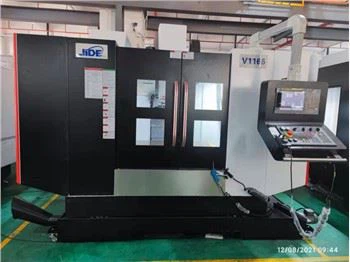
Operating the control panel of a CNC turning lathe machine is a crucial skill for anyone involved in the manufacturing industry. As a supplier of CNC turning lathe machines, I understand the importance of providing clear and comprehensive guidance on how to operate these sophisticated pieces of equipment. In this blog post, I will walk you through the process of operating the control panel of a CNC turning lathe machine, from basic setup to advanced programming.
Understanding the Control Panel
The control panel of a CNC turning lathe machine is the interface between the operator and the machine. It consists of a variety of buttons, switches, and displays that allow the operator to control the machine's functions and monitor its performance. Before you start operating the machine, it is important to familiarize yourself with the different components of the control panel.
Power On and Off
The first step in operating a CNC turning lathe machine is to power it on. Locate the power switch on the control panel and turn it to the "On" position. The machine will then go through a self-check process to ensure that all systems are functioning properly. Once the self-check is complete, the control panel will display the machine's main menu.
To power off the machine, simply turn the power switch to the "Off" position. It is important to follow the proper shutdown procedure to prevent damage to the machine and ensure its safety.
Emergency Stop
The emergency stop button is a critical safety feature on the control panel. In case of an emergency, such as a malfunction or a dangerous situation, press the emergency stop button immediately. This will stop all machine operations and prevent further damage or injury.
Once the emergency situation has been resolved, you can reset the machine by turning the emergency stop button counterclockwise and then powering the machine back on.
Manual Operation
The control panel allows you to operate the machine manually. This is useful for setting up the machine, testing its functions, and performing simple machining operations. To operate the machine manually, select the "Manual" mode on the control panel.
In manual mode, you can use the control buttons to move the machine's axes (X, Z) and control the spindle speed and direction. You can also use the handwheel to make precise adjustments to the machine's position.
Automatic Operation
The automatic mode is used for performing complex machining operations that are programmed into the machine's control system. To operate the machine automatically, select the "Automatic" mode on the control panel.
In automatic mode, the machine will execute the programmed instructions step by step. You can monitor the machine's progress on the control panel display and make adjustments if necessary.
Programming the Machine
Programming a CNC turning lathe machine involves creating a set of instructions that tell the machine how to perform a specific machining operation. There are several ways to program a CNC turning lathe machine, including using G-code, M-code, and conversational programming.
G-code and M-code
G-code and M-code are the most commonly used programming languages for CNC machines. G-code is used to control the machine's movements, such as positioning the tool, controlling the feed rate, and setting the spindle speed. M-code is used to control the machine's auxiliary functions, such as turning on the coolant, starting the spindle, and changing the tool.
To program the machine using G-code and M-code, you need to create a program file using a text editor or a CNC programming software. The program file should contain a series of G-code and M-code commands that define the machining operation.
Once you have created the program file, you can transfer it to the machine's control system using a USB drive or a network connection. Then, you can select the program file on the control panel and start the machining operation.
Conversational Programming
Conversational programming is a user-friendly way to program a CNC turning lathe machine. It allows you to create a program by answering a series of questions on the control panel display. This is ideal for operators who are new to CNC programming or who need to create simple programs quickly.
To use conversational programming, select the "Conversational" mode on the control panel. The control panel will display a series of questions that ask you to define the machining operation, such as the part dimensions, the tool type, and the cutting parameters.
Once you have answered all the questions, the control panel will generate a program file automatically. You can then review the program file and make any necessary adjustments before starting the machining operation.
Setting Up the Machine
Before you start a machining operation, it is important to set up the machine properly. This includes installing the workpiece, selecting the appropriate tool, and setting the cutting parameters.
Installing the Workpiece
The first step in setting up the machine is to install the workpiece. The workpiece should be securely clamped to the machine's chuck or collet to prevent it from moving during the machining operation.
To install the workpiece, first clean the chuck or collet and the workpiece surface. Then, place the workpiece in the chuck or collet and tighten the jaws or collet using the appropriate tool. Make sure the workpiece is centered and aligned properly.


Selecting the Tool
The next step is to select the appropriate tool for the machining operation. The tool should be selected based on the material of the workpiece, the machining operation, and the desired surface finish.
To select the tool, use the tool magazine on the control panel. The tool magazine contains a variety of tools that are pre-loaded into the machine. You can select the tool by entering its tool number on the control panel.
Setting the Cutting Parameters
The cutting parameters, such as the spindle speed, feed rate, and depth of cut, are critical for achieving the desired machining results. The cutting parameters should be selected based on the material of the workpiece, the tool type, and the machining operation.
To set the cutting parameters, use the control panel to enter the appropriate values for the spindle speed, feed rate, and depth of cut. You can also use the control panel to adjust the cutting parameters during the machining operation.
Monitoring and Adjusting the Machining Operation
During the machining operation, it is important to monitor the machine's performance and make adjustments if necessary. This includes checking the machining accuracy, the surface finish, and the tool wear.
Machining Accuracy
The machining accuracy is determined by the machine's positioning accuracy and the cutting parameters. To check the machining accuracy, use a measuring tool, such as a micrometer or a caliper, to measure the dimensions of the machined part.
If the machining accuracy is not within the desired tolerance, you can make adjustments to the machine's positioning or the cutting parameters. You can also use the control panel to compensate for any errors in the machining process.
Surface Finish
The surface finish is an important quality characteristic of the machined part. It is determined by the cutting parameters, the tool type, and the machining process. To check the surface finish, use a surface roughness tester or a visual inspection.
If the surface finish is not within the desired specification, you can make adjustments to the cutting parameters or the tool type. You can also use a different machining process, such as finishing or polishing, to improve the surface finish.
Tool Wear
Tool wear is a common problem in machining operations. It can affect the machining accuracy, the surface finish, and the tool life. To monitor the tool wear, use a tool wear sensor or a visual inspection.
If the tool wear is excessive, you need to replace the tool immediately. You can also adjust the cutting parameters to reduce the tool wear and extend the tool life.
Conclusion
Operating the control panel of a CNC turning lathe machine requires a combination of technical knowledge, practical skills, and experience. By following the steps outlined in this blog post, you can learn how to operate the control panel effectively and perform a variety of machining operations.
As a CNC turning lathe machine supplier, we are committed to providing our customers with high-quality machines and comprehensive support. If you have any questions or need further assistance with operating the control panel of our Horizontal Cnc Lathe Machine, please do not hesitate to contact us. We are here to help you achieve your machining goals and ensure the success of your business.
If you are interested in purchasing a CNC turning lathe machine or learning more about our products and services, please contact us for a free consultation. Our team of experts will be happy to assist you and provide you with the information you need to make an informed decision.
References
- CNC Machining Handbook
- CNC Programming Guide
- Machine Tool Operation Manual