


How to look down on the programming of the workpiece from the perspective of an eagle?
How to study the details of each step of the knife with the aim of a mouse?
One of the methods is: drawing
1. What picture should I draw?
Today, from the aspect of milling, I once again emphasized this big trick:
Draw a tool path diagram
This big move is already a super big move. However, some people may say that this method is nothing, and they have heard of it a long time ago.
Yes, knowing does not mean it will be effective.
When you draw the tool path diagram, you can visually see the tool path trajectory, so that you can look down on the part programming from the perspective of an eagle, and you can also study the details of each step of the knife with a mouse.
So how is this trick applied in programming?
Give an example of number milling:
For the following parts, the inner hole with a diameter of D133.2 and a depth of 10 requires machining the bottom plane of the inner circular hole.

The tool path diagram is as follows: Use spiral interpolation to lower the tool, and then mill to the size from the inside to the outside circle by circle.
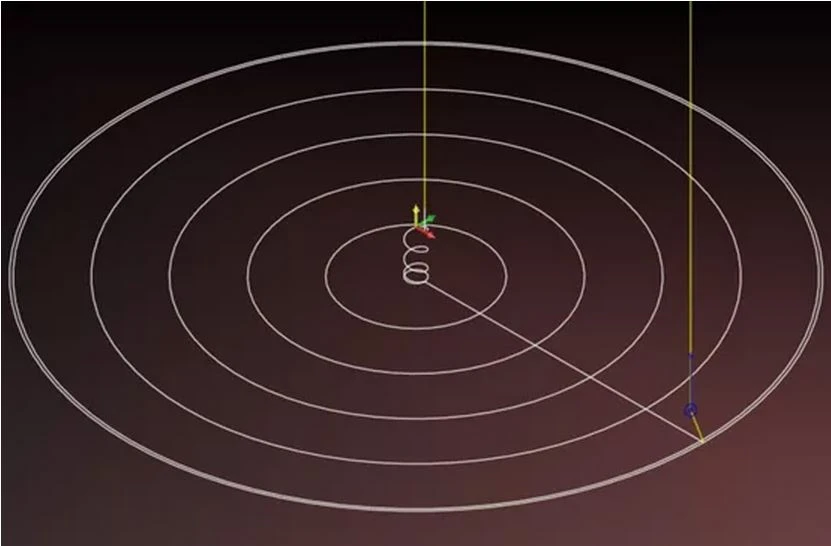
This tool path program consists of two parts:
1. Spiral interpolation cutting program
2. The program of milling the bottom surface of the inner hole
I have shared the programming ideas about helical interpolation milling, so I won’t go into details here.
The program of direct upward spiral interpolation milling is as follows:
...
#10=20
#11=16
#24=[#10-#11]/2
N1
G00 X#24 Y0
Z5.
#1=0
G1Z#1F1000
WHILE[#1GT-10]DO1
#1=#1-4
IF[#1LE-10]THEN#1=-10
G3I-#24Z#1F500.
END1
G3I-#24
After the spiral cutting is completed, the tool Z=-10 has been spirally interpolated to the bottom plane of the hole. At this time, a full circle is milled, and then the bottom hole is milled. The tool path is as shown in the figure below:

Mill a circle, then X moves by one step, and then mill a full circle, and so on to the final size of the drawing.
From the above tool path diagram, it is easy to see that the X value is constantly changing.
How does it change?
That is to move one step in the X direction, if the variable #2 is set to represent the step (the distance of each movement in the X direction, that is, the step).
If the moving distance is 80% of the tool diameter, then:
#2=#2+0.8 *#11
Remarks: #11 is the tool diameter variable I set arbitrarily when writing the spiral interpolation milling program.
In this way, the movement of the step distance is realized through the increment operation of variable #2.
Since the set variable #2 represents the step distance, the movement of the step distance is realized through the variable increment operation.
So what is the scope of #2?
Or in other words, from which coordinate point does the variable #2 start to move, and at which point coordinate does the auto-increment operation end?

The variables set up in the figure above:
#24 Spiral interpolation cuts the tool to the bottom plane of the hole. At this time, milling a full circle is the variable coordinate in the X direction, which is the initial cutting point of #2.
So: #2=#24
Same as #2=#2+0.8 *#11 self-increment,
In other words, the variable #2 is incremented to the size of 66.6, and the circle is processed to size.
From this, it is easy to contact the macro statements that Jun brother has said before, such as WHILE []DO statements
......
With the above simple analysis, the program for milling the low plane is as follows:
N2
#2=#24
WHILE[#2LT66.6]DO2
#2=#2+0.8*#11
IF[#2GE66.6]THEN#2=66.6
G1X#2
G3I-#2F100
END2


