

Learning masterCAM is the same as learning other software. First of all, you must have the perseverance to learn, and you must think and summarize more. I hope that the following article will give you some inspiration and reference for those who are learning CAM.
One: About the precautions and precautions before learning masterCAM
1. Give yourself a goal every day what to learn.
2. When you want to learn, please turn off QQ and all chat tools, and use 100% concentration to learn.
3. The materials downloaded in the forum should be carefully read and learned. Remember to soak up the information in the forum all day long without actual learning actions.
4. Learning any software is the same. First of all, we must have the necessary professional basic knowledge. For example, mechanical drawing is one of the most important basic disciplines.
5. To learn CAM, you must have certain cutting knowledge and processing experience (including general machine tool processing experience).
6. Learning theoretical knowledge and learning practical experience are equally important. Some of the most basic learning is indispensable. Often beginners only pay attention to the study of example tutorials. Therefore, the theory is ignored, and the two should be combined to achieve the most ideal learning effect.
7. Learning masterCAM at the same time is not conducive to learning other software at the same time, because often learning several software at the same time, the software application function is chaotic. Learning software requires a single breakthrough method.
8. Sample Text remember to want to learn everything. As a result, I can't learn everything well and know everything. .
Using Mastercam's experience, functions, skills, and 2D milling, the features of Mastercam programming are fast and convenient. This feature is particularly prominent in the 2D knife path.
1. The series connection of Mastercam is very fast, as long as the curve you draw is continuous. If it is not continuous, it is very easy to check out where there are breakpoints. A simple method is: use the analysis command to set the tolerance to the smallest value, 0.00005, and then select the seemingly continuous curve, where there is a problem. It can be done quickly by curve fusion.
In short, in Mastercam, as long as the contour edges, step lines, holes, slot lines, etc. of the processed parts are all done, the next cam operation is very convenient.
2. Because Mastercam's 2d series connection is convenient and fast, no matter how many contour lines you process the workpiece at one time, it is always easy to select all of them. A great advantage is that the beginning of the series is where the infeed arc (usually set the infeed arc).
3. When processing runners or multiple curves, there are often many curves to be selected. Since there is no need to offset the radius of the cutter, in Mastercam, you can use the frame selection method to select at one time
2. 3D surface grooving: rough opening of Mastercam
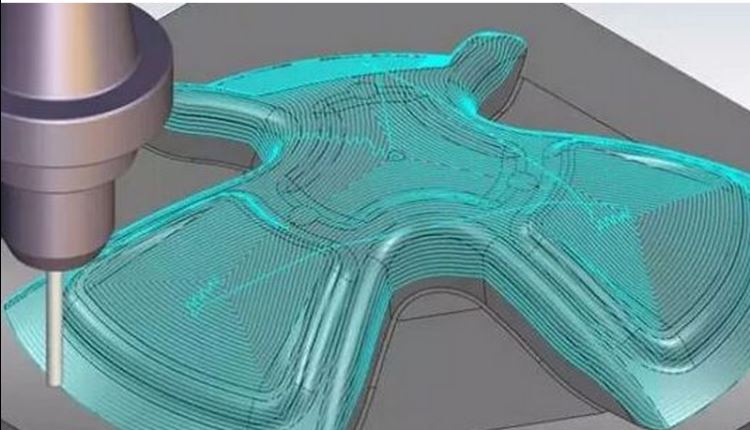
1. It is best not to cut the knife inside the work piece for gongs and copper males or male molds. Mastercam can easily select a point as the cutting point each time, add WeChat: steven52014 will send a copy of the macro program tutorial. Of course, this point is outside the workpiece, but don't deviate too far from the workpiece. This function of Mastercam is designed very well, with less tool lifting, high efficiency, and basically can ensure that the cutting point is at the same point, and the processing is relatively safe.
2. If you use this method in the gong cavity, or the low-lying place of the copper male, the spiral cutting is very important, and the spiral cutting angle should be as small as possible. Copper material is suitable for 3 to 5 degrees, and steel material should not exceed 5 degrees. I think 2 degrees is the best. The processing is relatively stable, and there is no big noise.
3. An important setting: if all entry attempts fail, please select skip. Otherwise, when milling to the bottom cannot be screwed or diagonally cut, it will be inserted straight.
4. A unique trick: When grooving on a curved surface, check the "follow boundary" in the parameter column of the spiral tool. Not many people may use this feature. But the effect is greatly good. It can make the tool go down to the deepest part of the workpiece, and cut around, instead of straight insertion!
3. Processing of 3D runner:
Note that it is 3D rather than 2D; it is 3D with a steeper slope rather than a flatter 3D.
1. In Mastercam, if it is to process a relatively flat 3D flow channel, the function of using 3D curve processing is the best. But if the damage is large, or like a wave. It is necessary to use the projection processing method to project the center line of the 3d runner onto the surface. Then it is processed down to the depth of the radius of the ball cutter in many times of negative compensation.
4. About parallel milling:
The parallel milling processing method used by Mastercam has the highest usage rate. Disadvantage: there is a steep place on one side that will not be well milled.
There is an excellent way to pass in Mastercam, which is scallop in surface finishing. This tool path in Mastercam is very easy to use, and some people report that the calculation is time-consuming. But if the error is set to one wire, the calculation speed is not slow, and the processing effect is already very good. I have compared it, and things with a slight tolerance and a half-silk gong look similar.
5. About the clear angle:
Mastercam must use the method of clearing the corners from the outside to the inside (that is, the corner). This is preset in Mastercam
Six, about the call of the tool:
In Mastercam, when you create a tool, you can set the tool's diameter, r angle, number of revolutions, feedrate and other parameters at one time. When calling this tool later, there is no need to set the number of revolutions and feedrate every time.
7. Depth setting of parallel milling:
1. In Mastercam, surface processing can also define the milling depth, which is an excellent function!
2. In some cases, you may not want to make the ball cutter mill so deep, or calculate that it is milled to the plane below, just a little bit shallower. In Mastercam, you can get a good result by adjusting the cut depths. Control to ensure that the tool does not touch the bottom plane.
8. Questions about flat knife compensation:
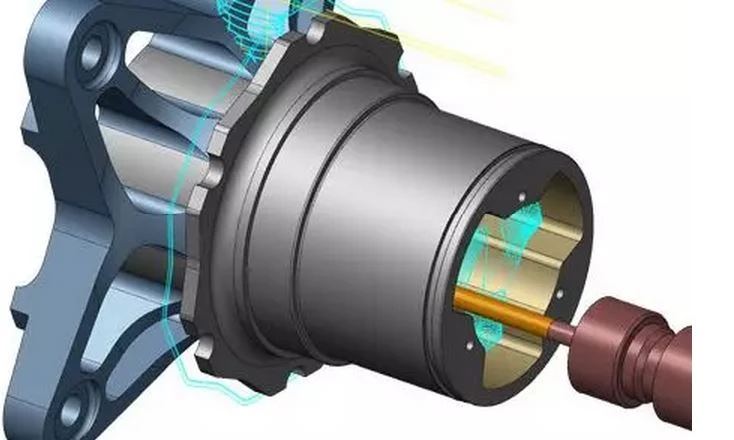
When milling a curved surface, neither Mastercam (it is said that the x version is possible, but I have not tried it) and UG can not make negative corrections for flat knives. I think the best way is to subtract the unilateral negative compensation amount*2 from the actual size of the knife during programming. Some people say that adding an angle r to the knife can make negative corrections. This is really said and done without careful research. It is not impossible to add angle r, but it depends on the situation. If the slope is not large, you can do this, adding an angle r as small as possible; but if it is a surface with a large slope, if you still use this method, The actual processed size and the estimated size will be too small, the larger the r angle is set, the greater the error. It doesn't matter if the thick male is smaller, if it's a back model, I'm afraid it's not very good.
picture
9. Regarding the number of revolutions:
Use a small knife, of course, the number of revolutions is higher. But it doesn't have to be quite high, and it just makes the machine tool out of breath. Can you imagine it? I use an ordinary machine tool and my own 0.1 knives, which can process stencil embossed fonts with a length and width of less than 2mm, add WeChat: steven52014 will send a copy of the macro program tutorial, and the number of revolutions is only 4000 revolutions! The feed rate is not low, and it takes only one hour for sixteen embossing dies. Fast? Most people probably think that it takes tens of thousands of revolutions and an engraving machine is necessary, right? Those who engage in cnc programming have to discover many methods by themselves, and don’t become intimidated by others’ and circulated methods.
Don't dare to open up new methods.
10. Post-processing:
Mastercam is indeed a popular software, so its use coverage is extremely wide. In the early years, when the cnc programming industry was in full swing, how many people did not use Mastercam? Mastercam programming is fast, and the post-processed nc program is also very safe and worthy of rest assured. I have used three different machine tools for cnc programming, and none of them has had any problems with the post-processing of Mastercam. Except for the machining centers of special models, ordinary computer gongs can read the nc program produced by Mastercam unobstructedly! Beginners generally don't have a headache for post-processing. This is very impressive!


